Stable
1.10.10117
Daily-driver build with the safest release cadence.
- Updated
- 3 days ago
- File Size
- 536.7 MB
- Release Notes
- Open notes
Stable is the recommended track for most users. Alpha gets you the newest capabilities first.
Daily-driver build with the safest release cadence.
Fastest release track with the newest features and experiments.
Every release stays linked here so you can inspect what changed before you switch versions.
A lot of work went into making Behavior Trees and the entire scripting system more flexible. We can now finally build bots using only Macros and Behavior Trees, without needing to rely on Auras.
Combining two complex systems (Auras and BT) made the logic harder to follow, so the new nodes should make things much clearer. And this is not the end of it — more changes are coming soon, especially around preview-related functionality.
For many years, all Capture triggers (Image/Color/Text/ML) required the Target Window parameter — EyeAuras worked only with windows.
Starting with this version, we are trying a different approach:
Target Window is not specified, EA will capture the primary screen.Target Window field would effectively stop those triggers from working. Now it simply switches them to primary screen capture mode. I strongly recommend using Enabling Conditions to control capture. This is important! Check your old triggers to make sure there are no "test" or "forgotten" ones — they will start consuming CPU.Target Window is no longer required.IMPORTANT! Multi-monitor setups are not supported yet. Only the primary screen is captured. Support will be expanded in the future.

Running state.if..then..else as a BT node, useful for users who are just getting familiar with BTs.Ctrl+Z / Ctrl+Y.MouseMove can now use CvLastFoundRegion from CV searches..css, .js, .md, .dll) via IScriptFileProvider.[Keybind].[Dependency] or init properties for services such as SendInput.AppStarted, making it possible to automate processes without showing the EA UI.A programmable interface for Image Search, Pixel Search, ML Detection, and Text OCR with OSD overlay support. More details here.
Already cancelled).Min value.IBlazorWindow now has a new TitleBarViewType property, allowing complete replacement of the window title bar.Clear() method to MiniProfiler.WorldToWindow matrix to WindowImageProcessedEventArgs, making window coordinate calculations after Refresh() easier.string to WindowMatchExpression.Percentage struct for percentage values (for example, 0.1 = 10 %).Opacity.LoginWidget could behave incorrectly.AuraScript utilization).SendInput API has been moved from SendInputUnstableScriptingApi to SendInputScriptingApi — it has not changed in a year and is stable enough now.@Rowenor for catching it!IncludeTextSegments parameter was not saved in config.Move To Parent option in the aura tree.Non-authorized users are not allowed to update shares).Event Log.CodeEditor alignment in the maximized window..) in aura names has historically caused many problems, because EA saves auras to disk using those names, and a dot usually separates a file name from its extension. EA will now show an error if you try to set a name containing a dot, just like it does for other invalid characters.The new option is available only in those nodes which work with image capture right now - pixel color checks, ML, image search, etc. It is very simple and semantically equivalent to Inverter node, but built in. The reason is BTs tend to grow very-very quickly and reducing overall amount of nodes should help keeping them structured.

p.s. I know these have been quiet few weeks, internally I am working on a new large feature, which will be available to public later this year. I'll keep you posted.
Huge amount of work has been done on internals of the program, too many to list. All-in-all, such things tend to lead to a string of bugs, please, pay attention to any irregularities and report them, I will be closely monitoring the inbox.
Writing a script in ExecuteScript node and accidentally removing it is a pain. Been there, done that.
This feature will allow you to easily rollback such changes on the spot. For now, Undo/Redo supports only nodes addition/removal, other nodes modifications will be added as soon as the mechanism will become stable enough.

IBlazorWindow now has a new property TitleBarViewType` which allows to fully replace window title bar with whatever you wantPreviously, there was a single way to make Trees and Macros "tick" and "run" (correspondigly).
If you wanted to make the tree run when/while some hotkey was pressed, you had to use a separate Aura with HotkeyIsActive trigger in it.
In the new version you can just add that same hotkey in the Tree/Macro straight away, reducing number of operations and complexity of configuration drastically.

In original HotkeyIsActive triggers, there is a functionality, which allows to restrict hotkeys to a specific window/application/etc.
This mechanism is directly responsible for enabling/disabling hotkeys handling at any given moment. By adding one or multiple auras you can specify exact set of conditions, which must be met before Trigger will start doing anything.

For example, by linking Aura which has WindowIsActive in it, you will make Trigger react only to keys which were pressed while game window is active.
In more complex cases, you can link the trigger to some in-game condition, for example, you when you click RMB(part of HotkeyIsActive configuration) AND some powerful skill is off-cooldown(linked condition), instead of casting whatever is usually on RMB, you'll simulate key press of a button which casts that skill. A good example would be automating cast of Vaal Skills on Path of Exile - you have the usual version of a skill bound to some button which you spam and whenever Vaal version got enough souls, it will be automatically release without you having to remember about it.
In BTs, the equivalent will be adding Enabling Condition on the tree itself - just like you did it before. The hotkey will be intercepted only if Enabling Condition is met. We'll see how that approach goes - please send your feedback.
 Very important new node in BTs ecosystem - it allows to conditionally interrupt already running nodes.
Usually, when some node is Running (like
Wait or Until Success), there is no chance to other nodes in the tree to do anything - EyeAuras just waits for the node to complete its work.
In contrast, Interrupter node, when executed, ALWAYS runs Condition(left) node, even if the Action(right) node is Running. Moreover, if Condition succeeds, instead of giving control to already Running Action, it will interrupt it from further activity.
This could be used to break long-running actions (e.g. Wait) or make some loop(like Until Success) stop on demand - the node is emmensely powerful given right conditions.
 Very simple node, which checks the current state of the specific key. If it is pressed, the node returns Success.
 Another node which is expected to be paired with long-running nodes such as
Until Success - it allows you to put a maximum time which you "allow" the child node to Run. The first combination of nodes which comes to mind is something like this:
 By combining
Timeout -> Until Success -> Image Search you basically tell the tree Keep trying to find the image until you Succeed, but no longer than for 2 seconds.
Started to work on startup time improvements and, more specifically, "cold" (first) start.
Here are startup times for the latest pack for GTA5 by @linx - https://eyeauras.net/share/S202503032233289fPxqP4AA0N0
v8215 - 33.41s
v8224 - 28.89s
So the new version is approximately 15% faster on the first launch.
Subsequent launches:
v8215 - 29.38s
v8224 - 27.10s
~8% faster.
I will keep working on improving those stats.
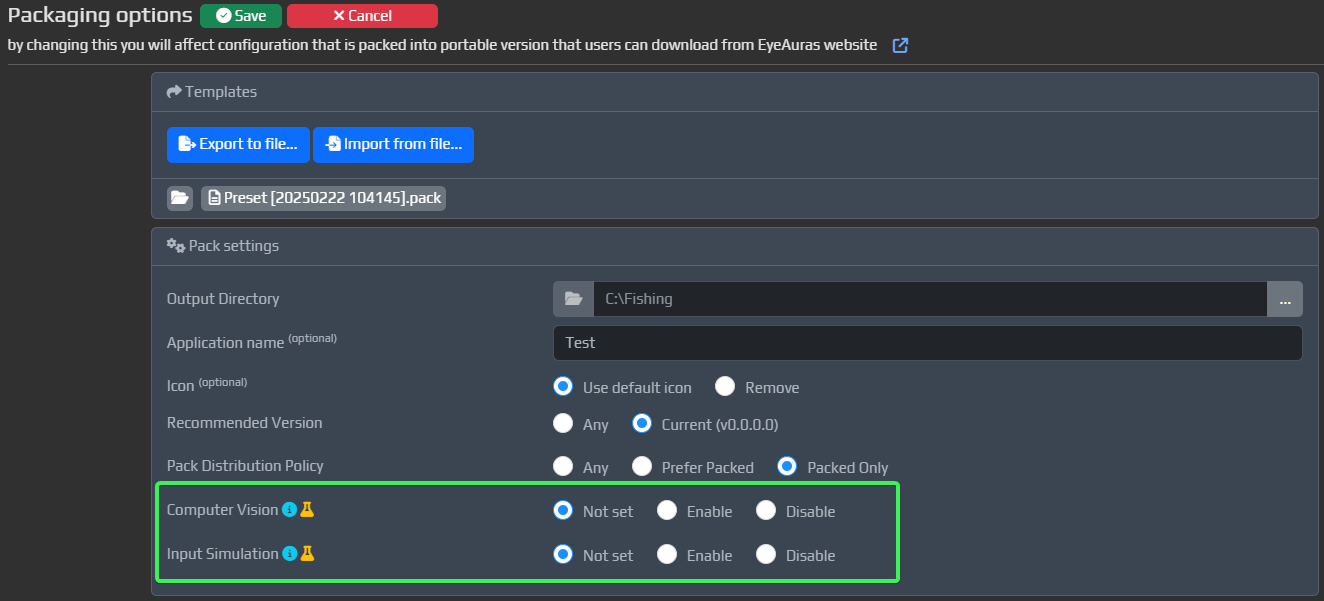
Sometimes, you do not need ALL the functionality which is built into EyeAuras in your Packs. For example, if your pack does not use computer vision at all, it does not make much sense to load CV-related modules into the memory - this is waste of both CPU and RAM. With the new functionality around working with applications directly - such as reading memory - it is expected that there will be more and more cases where you just want to use EyeAuras as a platform for development and distribution own of your app.
This feature is intended to be used exactly for that purposes - you now can disable some parts of the application from loading. Those modules, which are blacklisted:
For now, we have two types of modules which could be excluded:
Blacklist is a part of Pack configuration. By default, everything is shipped, but you can disable two types of modules/
KeyLogin is a way to sign in using a one-time license key — no account creation required. This system is intended to be used along with Sublicenses to allow your users to access your cool Packs as quickly as humanly possible.
That is how the process looks right now
For end-user(the person who will be using the pack):
Download packThat is it. I think this is as simple as it could get and we'll stay in that state for some time and see how it goes.
For you(author, who is creating the pack):
Yeah... for authors the process is not as straightforward. I will streamline it this year.
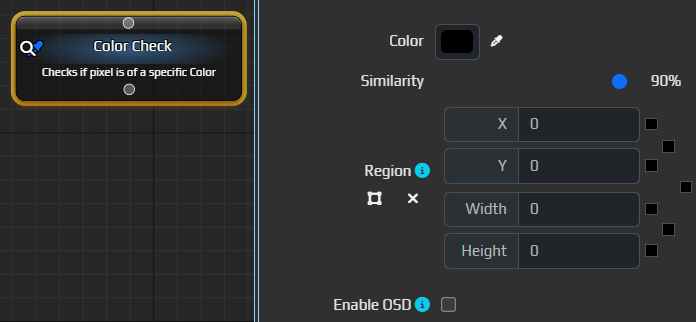
Allows to check that the color of a specific pixel(or region) matches selected one.
Probably one of the most useful nodes out there - fast, very easy to use and very flexible.
Allows to find image somewhere on the screen/in a selected region.

Added new node, which is intended to be used by those who are more comfortable with "classic" logic building.

 New node in BTs and Macros, which allows you to run ML search over a region of a screen/window.
It is still missing a lot of options currently present in MLSearchTrigger such as Configende/IoU thresholds, inference method, number of threads etc - those will be added in the nearest future.
Note, that by itself this node does not do anything - you have to pair it with other nodes such as MLFindClass or MouseMove to get anything from it.
By default, it will pick the very first object and make it available for click via MouseMove - for some very simple scenarios that will be enough, for more complex one - use MLFindClass
The node will return Success only if there is at least one found prediction.

This node must be used in pair with MLSearch and allows to pick some class(~object) from the output generated by MLSearch - you can set some filtering parameters such as class name(s), minimum confidence threshold, size restrictions, etc. Those predictions which do not match any of those, will be filtered out.
Out of those predictions which will be left after filtering, you can make the node pick exactly one of them - it could be the very first in the list or the one with the highest confidence or even the one that is currently closest to the cursor.
The node will return Success only if there is at least one found prediction that matches all the criteria.
Of course, both MLSearch and MLFindClass could be used in combination with all other nodes. Here is, for example, priority-based target selection
