Builds

Available downloads

Stable is the recommended track for most users. Alpha gets you the newest capabilities first.

Stable 1.10.10117 Alpha 1.9.10071
Windows 10/11 x64 Administrator rights
Release Notes

Track recent changes

Every release stays linked here so you can inspect what changed before you switch versions.

Release

1.3.5643

Permalink 3 years ago

Bug Fixes / Improvements

  • [Network Message] Fixed a crash caused by a server/client version mismatch
Release

1.3.5625

Permalink 3 years ago

Auto-update improvements

A new option is now available in Settings: Automatic update downloads.

When enabled, new versions will be downloaded in the background as soon as they become available, so you can install updates much faster than before.

  • You can still postpone the update if you're not ready to install it yet. The system will wait for your confirmation.
  • Want to see what’s included in the update? Click the cloud icon to open a pop-up with detailed information.
  • The pop-up behavior has also been improved to make it less intrusive. Instead of showing notifications for every minor update or informational event, you’ll now see a subtle notification next to the small cloud icon in the window header.
  • Error notifications have been improved as well. Short error messages will appear next to the cloud icon, while detailed error information will be shown in the pop-up window.
  • The changelog has also been rewritten from scratch. Feel free to share your thoughts on the new UX — your feedback matters.

Image

Bugfixes / Improvements

  • [SendInput] [Usb2Kbd] Added a new CharSet option that lets you choose between ANSI and Unicode. This change improves compatibility with different OS versions. The default setting is ANSI, which should be sufficient for most users.
Release

1.3.5602

Permalink 3 years ago

Send Network Message Action / Network Message Trigger Improvements

Infrastructure changes have been rolled out that significantly improve the performance of sending and receiving network messages. This can be used to build a network of interconnected EyeAuras instances that perform actions together, such as remote control, multiboxing, and similar setups.

There are now multiple hubs in each region (RU/EU), and the system will try to choose the one closest to your physical location. This should noticeably reduce latency, especially for RU/CIS users, who previously sometimes used EU servers even for internal traffic. Select the hub closest to you, and the new routing rules will try to use the server in that region that provides the best latency.

Image

As with any infrastructure change, there is always a chance that something might break. If you notice increased latency (or even just higher perceived latency), or something does not work as expected, please let me know.

Latency

In addition to deploying extra servers and adjusting routing, I also changed how network messages are processed, which should further improve overall latency. You can now see the latency for each message directly next to its timestamp. Latency is calculated using the sender's and receiver's local time (in UTC, so the time zone does not matter), which means the value may be somewhat inaccurate if the clocks are not synchronized.

In my own testing, latency dropped from ~100ms to ~20ms after the server-side changes.

US Servers

As far as I know, there are not many users in the US right now, so expanding the infrastructure into a US region is mostly a matter of financial viability. Everything is technically ready, though, so when the time comes, I will add US servers.

Actions / Overlays / Triggers Can Now Be Ignored

Every action, trigger, and overlay can now be Ignored. This is controlled by the checkbox to the left of its name and, effectively, makes the ignored entity behave as if it does not exist.

  • For triggers, they are excluded from all evaluations.
  • For actions, they are skipped even if the action block is executed.
  • For overlays, the overlay is closed and unloaded.

This is especially useful when debugging or configuring something and you want to temporarily disable part of an aura.

P.S. This change does not affect C# scripting.

BUG FIXES / IMPROVEMENTS

  • [Text Search] Fixed(?) a crash related to out-of-bounds memory access in Tesseract.
Release

1.3.5571

Permalink 3 years ago

New Windows OCR Text Recognition Method Added

What does this mean?

The TextSearch trigger now includes new options in the "Symbols" dropdown. These let you use Windows-based optical character recognition (OCR) to convert images into text. In testing, this approach proved to be more reliable and performant than the previous Tesseract-based OCR used in EyeAuras.

Please note: to use Windows OCR, you must install the required language pack in Windows. For example, if you want to recognize Spanish characters, the Spanish language pack must be installed on your system.

There is also one limitation that still needs to be addressed: Windows OCR does not support multilingual OCR. In practice, this means it cannot recognize Russian and English characters in the same sentence, for example. There are some well-known workarounds for this, but this method should first be tested as-is, without additional logic layered on top.

A few tips:

  • Binary thresholding, which was widely used with Tesseract OCR, is much less effective with Windows OCR. This is one of the reasons the new method is both faster and more reliable.
  • Size matters. If OCR returns empty text, try adding scaling through the UI settings. In many cases, even a small image size adjustment can noticeably improve results.
  • If you installed a new language and it does not appear in the dropdown, simply restart the application.
  • You can read more in the wiki.

Bug Fixes / Improvements

  • [Image Effects] Improved the Eyedropper functionality — you can now specify a range that will be applied to the selected color. Exact selection creates an exact match, while narrow/wide applies scaling to create a region.
Release

1.3.5554

Permalink 3 years ago

Bug Fixes / Improvements

  • [SendInput] Fixed and improved the driver installation scripts for the virtual driver and input driver. They were no longer working correctly after recent security-related changes.
  • [WebUI Overlay] Fixed a rare crash that occurred when using a specific combination of UI controls.
Release

1.3.5514

Permalink 3 years ago

BUG FIXES / IMPROVEMENTS

  • [Bug Fix] A window no longer fails to restore after being minimized.
  • [Performance] Improved logging performance by reducing the number of WinAPI interactions.
  • The Settings and Image Effects windows are now smaller by default, so they fit better on lower resolutions (1280x720).
Release

1.3.5507

Permalink 3 years ago

Bug Fixes and Improvements

  • [Speech Overlay] Fixed an issue with region selection when using "Select Region"
  • [Image Overlay] Fixed a crash that occurred when the user selected an unsupported file. The overlay now displays a default image to indicate that something went wrong
  • [Image Overlay] Added support for the TGA (Targa) format
Release

1.3.5498

Permalink 3 years ago

Added a License Agreement

To address the legal side of things, I added a mandatory license agreement. It states that the user is solely responsible for complying with the license agreements of any applications they automate.

As many of you know, games often explicitly state that automating actions in any form is prohibited and may result in a ban. Please keep this in mind.

Improvements to Window Activation

For EyeAuras to work effectively, the window receiving input usually needs to be active. If it is not, EyeAuras includes several methods to automatically bring it to the foreground.

At first glance, this may seem like a simple one-line API call. However, due to various Windows-specific quirks, it is not that straightforward. As a result, I implemented several mechanisms to improve the chances of success.

In this release, I added more code to improve reliability, especially in edge cases and with applications that resist automated activation.

In short: if you are having trouble with window activation—for example, if a window does not become active when you send input—please contact me, as this version includes adjustments in that area.

YooKassa (formerly YandexKassa) Is Back

This may be useful for users in Russia/CIS: YooKassa is available again, and card payments are supported once more.

Bugfixes

  • Fixed an issue where Content/Position anchors were not being saved
Release

1.3.5430

Permalink 3 years ago

Actions can now be enabled or disabled

You can now temporarily disable any action in an Aura by clicking the checkbox next to its name. This is useful for debugging, and it is also available through the scripting system, so you can switch which actions will run based on options the user selected in your Custom UI, config file, and so on.

Another batch of anchor system changes

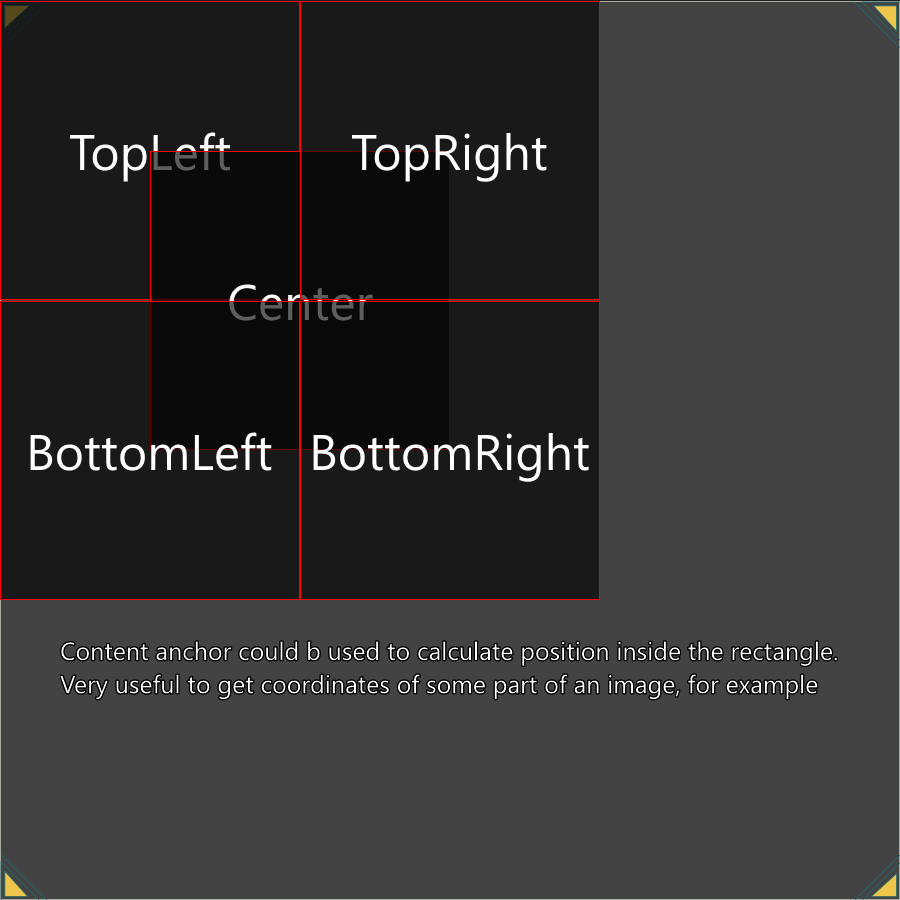
In 5397, I already made some changes to how anchors work across different EyeAuras screens, but that was not enough to cover some cases, such as clicking the center of an image found with Image Search.

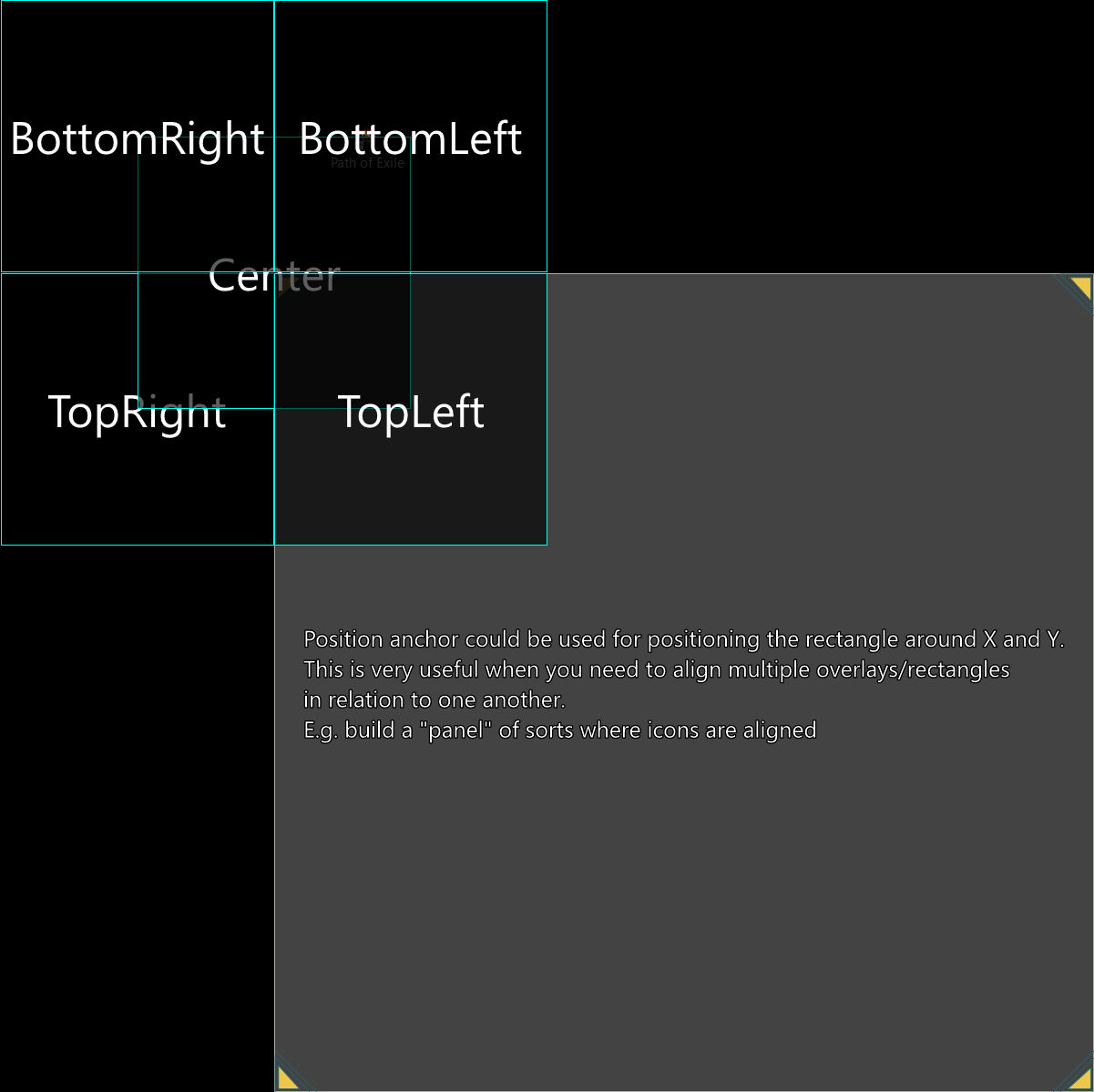
So now we have two different anchor types: Position and Content. This should make the system more flexible, although it may also introduce a bit of confusion.

Here is the main rule:

  • If you want to calculate the coordinates of a point, meaning X and Y, in most cases you should use the Content anchor. Clicking the center of an image found with Image Search via SendInput is the best example here.
  • If you want to position one rectangle relative to another rectangle, meaning X, Y, Width, and Height, you should look at the Position anchor. This is useful when you want to create a kind of "panel" — for example, placing several overlays that show cooldown timers next to each other. By using anchors, you can avoid specifying the coordinates of each overlay manually and use Bindings to move the whole panel as a single overlay.

More details and examples are available at https://wiki.eyeauras.net/en/coordinate-system
Bugfixes / Improvements

  • Fixed an issue where Public Auras became Unpublished after a package update in the Aura Library
  • The Aura Variables panel should now be visible again; it was accidentally hidden on the main screen
  • Fixed an issue with Bindings in SendInput — they had been temporarily disabled some time ago, and now they are back. This means the key combination can once again be configured through config/script.
  • Fixed an issue with invalid coordinates defined in Send Input when an Aura was Bound
  • Improved C# Script compilation speed
Release

1.3.5397

Permalink 3 years ago

Main focus

In June, the main focus was on improving scripting. Most of the results of this work will become available in August — behavior trees, pathfinding, and visualization.

I’m also actively working on a Diablo 4-related project that will bring together most of the current EyeAuras functionality to demonstrate what it is already capable of. Because of that, most of the systems I implement for that bot will also be released to all users as soon as their API is stable.

I’ll publish a detailed post once those features are ready for public use. If you’d like to try some of them earlier, feel free to contact me directly.

Wiki updates

A lot has changed in the Wiki: https://wiki.eyeauras.net/en/home

  • Added documentation for almost all action, trigger, and overlay types available in the app
  • Added documentation for the Coordinate System, which is used in some actions and triggers to define capture areas, clone areas, or click coordinates: https://wiki.eyeauras.net/en/coordinate-system
  • Added documentation for Text Match Expressions, which are used to evaluate recognized text or incoming network/Telegram messages: https://wiki.eyeauras.net/en/text-match-expressions
  • Added documentation for Window Matching Expressions, which are used to specify which window should be selected as the target window: https://wiki.eyeauras.net/en/window-matching-expressions
  • Take a look at the Dependencies Viewer, which is often overlooked but makes debugging complex aura setups much easier: https://wiki.eyeauras.net/en/overlays/dependencies-viewer
  • Added some technical information about Custom UI: https://wiki.eyeauras.net/en/overlays/custom-ui
  • Bindings: an extremely powerful mechanism that lets you connect trigger and action properties together — Bindings | EyeAuras Wiki
    • for example, you can find an inventory using Image Search and bind the detected area as the source region for another Image Search, which will then search only inside the inventory area
    • you can also bind overlay coordinates to Image/Text/Color Search and link the overlay lock state to HotkeyIsActive, allowing the user to quickly change the capture area by pressing a hotkey and dragging the overlay somewhere on the screen
  • Sync: a mechanism that makes it easier to share an aura set that you are actively working on

Anchor system improvements IMPORTANT CHANGE

Anchors are the coordinate system used anywhere you need to select an area — screen regions, image regions, and so on.

The idea is simple: by choosing different reference points, you can easily align capture or output areas relative to one another.

More details and examples are available here: https://wiki.eyeauras.net/en/coordinate-system

Input redirection improvements

This is a fairly niche feature available in the settings that lets you redirect all user input through a specific simulator.

  • You can now quickly enable or disable redirection from the main window, as long as a redirection simulator is configured in settings

Image

ML Search improvements

  • In the Effects window, you can now configure automatic screenshot capture/recording, which is very helpful when collecting a training dataset

Image

  • Performance improvements, especially noticeable in CPU mode
  • Fixed a crash related to loading an incompatible or broken model
  • Fixed a memory leak that occurred in Segmentation mode
  • Improvements to Segmentation and masks — a new "Group masks by class" mode has been added, allowing all masks of the same class to be merged into one, which makes them much easier to process
    • for example, if the neural network detects 6 different regions labeled as "Road", enabling "group by class" will merge all binary masks into a single "Road", along with their bounding boxes
    • Segmentation is the process of capturing not only object bounding boxes, but also their precise shape

Image

Bug fixes and improvements

  • Improved mouse capture — lower latency
  • Added status display
  • The 'New Clone' button has been removed. To create a clone now, go to: New Aura -> Overlays -> Clone and specify the area to capture/replicate
  • Startup speed optimizations
  • Drag'n'Drop should now feel more responsive
  • Fixed an AuraTree issue that caused sudden jumps while scrolling or selecting items